# Welcome

Welcome to XNS's official documentation and help resource.

<figure><img src="/files/mwd3muvAQbXCdzvFOB9E" alt=""><figcaption><p>Pssst come check our docs</p></figcaption></figure>

{% hint style="info" %}
Here you can find information regarding our SDK, resolver, key project updates and other technical details.
{% endhint %}

## What is XNS?

The XRP Name Service, or XNS, is a distributed technology based on the XRPLedger that provides an elegant solution to long and confusing crypto addresses: one URL, just like a website name or email, that represents a crypto address.

Our Solution:

1. Build a web3 persona
2. Organize your wallets
3. No more copy and pasting addresses

## Quick links

{% content-ref url="/pages/7V51QUk4O2DWMNbXqOve" %}
[Buying](/fundamentals/buying)
{% endcontent-ref %}

{% content-ref url="/pages/WERWvrYsKSmp8b0Xbxxf" %}
[For Developers](/use-cases/for-developers)
{% endcontent-ref %}

## Get Started

We've put together some helpful guides for you to get setup with our SDK quickly and easily.

{% content-ref url="/pages/WERWvrYsKSmp8b0Xbxxf" %}
[For Developers](/use-cases/for-developers)
{% endcontent-ref %}

{% content-ref url="/pages/FJ4LVem0tn1zUtZlkPth" %}
[Use Cases](/use-cases/for-designers)
{% endcontent-ref %}


# Buying

Instructions on buying a domain

> ***In the ever-evolving realm of the Web3 world, securing a domain that can effectively represent your digital identity is paramount. The XNS platform offers .xrp domains to replace convoluted wallet addresses with memorable domain names. Purchasing a domain on XNS is simple, straightforward, and can be completed in a few easy steps. This guide will walk you through the process.***

## How to buy an XNS Name?

### Step 1: Connect Your Wallet Using XUMM

The XNS platform seamlessly integrates with XUMM, allowing users to log in directly with their wallets. To begin, click on 'Connect Wallet' on the XNS homepage. This will generate a QR code. Open your XUMM app, scan the QR code, and approve the connection. There's no need for a separate signup.

### Step 2: Search for Your Preferred Domain

After logging in, you'll find a search bar on the XNS homepage. Use this tool to explore available .xrp domains. Type in your desired name and hit 'Search.'

<figure><img src="/files/SecXpybM3cLzEo5WIZpj" alt=""><figcaption><p>Search bar</p></figcaption></figure>

### Step 3: Browse Similar Domains

While your exact search may or may not be available, the platform provides a list of similar .xrp domains at the bottom of the page. This option is excellent for exploring alternatives and perhaps discovering an even more fitting name.

<figure><img src="/files/DjWQ41feQqYYbev3HWSE" alt=""><figcaption><p>Similar Domains</p></figcaption></figure>

### Step 4: Choose Duration and Buy

Once you've selected your ideal name, the next step is to choose how long you want to secure it for. After selection, click on the 'Buy' button to proceed.

### Step 5: Wait for the Minting Process

Upon clicking 'Buy,' a minting window will appear. Wait for the platform to initiate the minting process of your .xrp domain. Once it prompts you to 'Please accept the transaction in your XUMM wallet,' proceed to do so.

<figure><img src="/files/2wBkNEANrJQf71immdcm" alt="" width="375"><figcaption><p>Minting popup</p></figcaption></figure>

### Step 6: Confirm the Transaction and Receive Your Domain

Once you accept the transaction in your XUMM wallet, the platform will mint and then transfer the .xrp name to your wallet. And voilà! You now have your very own .xrp name.

Owning an .xrp name simplifies your interactions across various platforms in the Web3 ecosystem. As you navigate this new space with your personalized domain, stay tuned for more features and enhancements on our platform, like the upcoming introduction of domain extensions.

***Welcome to the frontier of digital identity in the Web3 world with your new .xrp domain!***


# Updating records

Here's a step-by-step guide to update text records for your .xrp domain!

## What are Text Records? <a href="#id-9d7f" id="id-9d7f"></a>

Text records are customizable pieces of information that you can associate with your .xrp name. These records can be used to store and share data such as contact information, social media profiles, or any other relevant details. Updating text records is an essential step in creating a seamless user experience for your domain.

## Why Update Text Records? <a href="#id-2350" id="id-2350"></a>

It enables you to personalize your name and make it more functional. These records lay the foundation for seamless integration with other projects that use your .xrp name, making it easier for users to interact with your domain.

## Format for updating records

Here's a table specifying what format to use for each text record field:

<table><thead><tr><th width="138">Record</th><th width="267">Description</th><th>Example</th></tr></thead><tbody><tr><td>Email</td><td>Any email</td><td>name@example.com</td></tr><tr><td>Avatar</td><td>An image url</td><td><a href="https://via.placeholder.com/100x100">https://via.placeholder.com/100x100</a></td></tr><tr><td>Url</td><td>Website to point your .xrp name. By default is set to your xns page.</td><td><a href="https://xns.xrp.page/">https://xns.xrp.page/</a></td></tr><tr><td>Twitter</td><td>Your Twitter username</td><td>@xnsnames</td></tr><tr><td>Github</td><td>Your Github username </td><td>@xrpns</td></tr><tr><td>Description</td><td>Any description you would like to add in text format.</td><td><p>A unique ID for wallets, websites, &#x26; more.<br></p><p>The XNS is a decentralized domain registry service on the XRP Ledger.</p></td></tr><tr><td>Reddit</td><td>Your Reddit username</td><td>@xrpns</td></tr><tr><td>Telegram</td><td>Your Telegram username</td><td>@xrpns</td></tr></tbody></table>

## Step-by-Step Guide to Updating Text Records <a href="#id-55a4" id="id-55a4"></a>

Here is a detailed guide on how to update text records for your .xrp domain:

### Step 1: Log in to the XNS dashboard <a href="#id-9084" id="id-9084"></a>

Visit the [**XNS platform**](https://app.xrpns.com/) and log in to your account. *Use the account that owns the .xrp domain you are trying to update.*

### Step 2: Access Your Domains <a href="#c8e5" id="c8e5"></a>

Navigate to your wallet, where you’ll find a list of your purchased .xrp domains (Alternatively, you can enter the name you are trying to update in the search bar). Select the domain for which you want to update the text records.

### Step 3: Update Text Records <a href="#bf34" id="bf34"></a>

On the domain management page, you’ll see a section for updating text records as shown below. Click the “[✏️](https://emojiterra.com/pencil/)” button next to a record to access the editor.

<br>

<figure><img src="/files/KL2xwnfEsZZeFYCoOJqW" alt=""><figcaption><p>Text records window to update records.</p></figcaption></figure>

Once you are done filling up the records you want, you can click on update records button and an update screen will show up with further instructions on how to accept it through your xumm wallet.

> **Note:** A transaction of **0.000001 XRP** will take place with a memo containing your updates. This is to keep a decentralized record of changes to your .xrp domains which is verified on the XRPL.

### Step 4: Saving Your Changes <a href="#id-9601" id="id-9601"></a>

After accepting the transaction on XUMM, your changes are saved. Projects and platforms can now access these details with our upcoming resolver.

### Step 5: Modifying existing records <a href="#dfeb" id="dfeb"></a>

To alter existing records, click the “[✏️](https://emojiterra.com/pencil/)” icon next to a record and follow the steps again. To copy any records to your clipboard, click the copy icon.

## Final Thoughts <a href="#de68" id="de68"></a>

***Once you update your records, they are publicly available for anyone to view.***

Updating text records for your .xrp domain is a simple but powerful way to customize your domain. By following this step-by-step guide, you can ensure your .xrp domain is personalized and ready for use in the growing web3 ecosystem.


# Using affiliate links

To express our gratitude and provide an opportunity for our members to earn rewards, we have designed an affiliate program that allows you to generate $XRP by sharing the benefits of XNS with others.

<figure><img src="https://miro.medium.com/v2/resize:fit:700/1*7HKKP-itavvpxtUK0kkj1A.png" alt=""><figcaption><p>Bluey comes bearing gifts ( ͡° ͜ʖ ͡°)</p></figcaption></figure>

## What is the XNS Affiliate Program? <a href="#id-0b9a" id="id-0b9a"></a>

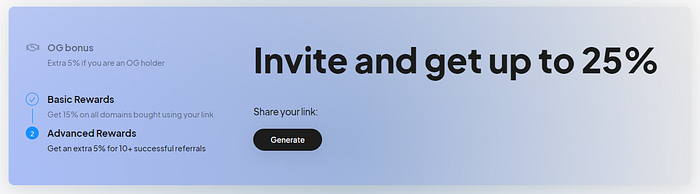
The XNS Affiliate Program is a referral system designed to reward community members for promoting the adoption of .xrp domains. By joining the program, you’ll receive a unique referral link that you can share with your network. When someone uses your link to purchase a .xrp name, you’ll earn a commission on the sale.

Here is a detailed breakdown on different tiers for our affiliate program:

<figure><img src="https://miro.medium.com/v2/resize:fit:700/1*ah0d0Eeb15OG0yo3hMCj3w.png" alt=""><figcaption><p>Reward tiers</p></figcaption></figure>

## How to Join <a href="#ba3a" id="ba3a"></a>

Joining our Affiliate Program is a straightforward process:

* **Sign in:** Log into the [**dashboard**](https://app.xrpns.com/) using your xumm wallet.
* **Navigate to our** [**affiliate page**](https://app.xrpns.com/user/affiliate)**:** Once logged in, click on “Get 25%” from the navigation menu.
* **Generate your Referral Link:** Copy your unique referral link and start sharing it with your network.

<figure><img src="https://miro.medium.com/v2/resize:fit:700/1*hm-vEdA8U30Igei9VXrXMA.png" alt=""><figcaption><p>Generate button for your personal referral link</p></figcaption></figure>

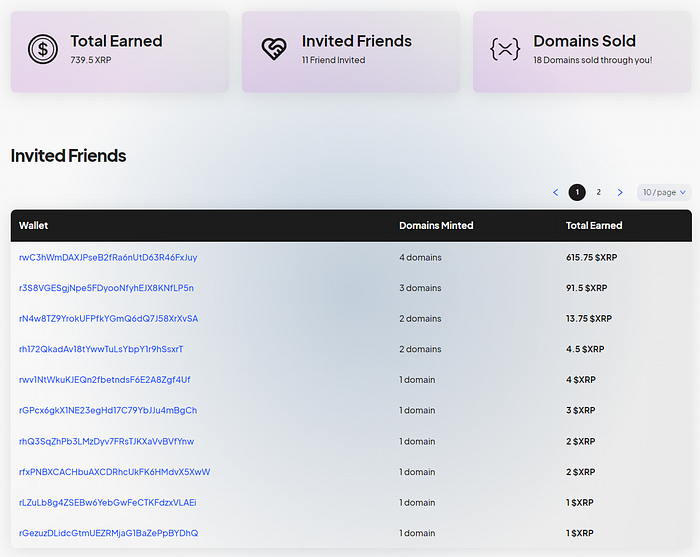
* **Track Your Performance:** Monitor your referral statistics, combo percentage, earnings, and payouts directly from our Dashboard.

<figure><img src="https://miro.medium.com/v2/resize:fit:700/1*uNlhnos_EL9pIlNdG_f5TA.png" alt=""><figcaption><p>Easy to keep track with our friendly affiliate dashboard</p></figcaption></figure>

## Benefits of the XNS Affiliate Program <a href="#e505" id="e505"></a>

You’ll be helping us build and enjoy numerous benefits:

1. **Earn Commission:** Receive a percentage of each .xrp domain sale made through your referral link.
2. **Track Your Progress:** Keep an eye on your performance, including successful invites, and earnings, through a comprehensive dashboard.
3. **Expand Your Network:** Introduce new users to the world of .xrp domains and help grow the XNS community.
4. **Support XNS Growth:** Play an active role in promoting the adoption of XNS and contribute to our success.

## We thank you for your invaluable support! <a href="#id-9248" id="id-9248"></a>

This Program offers an excellent opportunity for our community members to take part in our project’s success. At XNS, we believe that our thriving community is the backbone of our growth, providing invaluable support, feedback, and the network effect crucial for driving innovation in the world of web3 domains.

**Note: The XNS Affiliate Program is subject to terms and conditions. Please review the program’s policies before participating.**


# Setting up primary address

> Setting a primary .xrp domain for your XRPL wallet is an essential step for personalizing your account and streamlining your transactions. In this guide, we’ll walk you through the process step-by-step.

<figure><img src="https://miro.medium.com/v2/resize:fit:700/1*8kGJLFoa8madq4On2-1xtQ.png" alt="" height="700" width="700"><figcaption><p>When you realise you have a primary domain!</p></figcaption></figure>

## What is Primary Name? <a href="#bcbe" id="bcbe"></a>

A primary name refers to the main .xrp domain associated with your XRPL wallet address. It serves as a user-friendly identifier for transactions and interactions within the web3 ecosystem, simplifying the process and enhancing the user experience.

With the help of our resolver, projects can integrate these primary .xrp domains, allowing users to seamlessly interact with various platforms using their personalized domain instead of long and complex wallet addresses.

### Step 1: Log in to the XNS Dashboard <a href="#a4a7" id="a4a7"></a>

Visit the [**XNS platform**](https://app.xrpns.com/) and log in to your account. Be sure to use the account that owns the .xrp name you want to set as your primary.

### Step 2: Access Your Domains <a href="#id-0e0d" id="id-0e0d"></a>

Navigate to your wallet, where you’ll find a list of your purchased XNS names.

> ***Alternatively, you can enter the name you want to set as your primary in the search bar.***

<figure><img src="https://miro.medium.com/v2/resize:fit:700/1*CDT6F7wIwKyPsq_t0udIWg.png" alt="" height="398" width="700"><figcaption><p>Wallet Page</p></figcaption></figure>

### Step 3: Set Primary Name <a href="#id-28d0" id="id-28d0"></a>

Select the .xrp name you want to set as your primary which will take you to it’s domain management page. On the domain management page, you’ll see a **“Set as Primary Name”** button as seen below. Click this button to proceed.

<figure><img src="https://miro.medium.com/v2/resize:fit:700/1*7ZxYPb6lOYEJ-efbVKxhsg.png" alt="" height="289" width="700"><figcaption><p>Set primary name button</p></figcaption></figure>

### Step 4: Accept the Transaction <a href="#id-3ae8" id="id-3ae8"></a>

You’ll receive a transaction request in your XUMM wallet. Review the transaction details and accept it to finalize the process.

> ***Note: A small transaction fee of 0.000001 XRP will be charged to keep a record of the change in a decentralized manner, verified on the XRPL.***

<figure><img src="https://miro.medium.com/v2/resize:fit:677/1*yTLyGzAcDKN0cAQiZ7ZV2A.png" alt="" height="798" width="677"><figcaption><p>Dashboard while you confirm the transaction in XUMM</p></figcaption></figure>

### Step 5: Confirmation <a href="#id-6b1b" id="id-6b1b"></a>

Once you’ve accepted the transaction, you’ll see a confirmation message on the XNS dashboard. Additionally, you can go back to the domain management page to see if it has been set as your primary domain as shown below.

<figure><img src="https://miro.medium.com/v2/resize:fit:700/1*UerA4PmSrXsAYhNnjRcJGw.png" alt="" height="329" width="700"><figcaption><p>The dashboard informs you if a .xrp name is set as your primary domain name.</p></figcaption></figure>

## Removing and Changing a Primary Name <a href="#id-3254" id="id-3254"></a>

If you wish to remove or change your primary .xrp name, simply navigate back to the domain management page, and click on the **“Remove Primary Name”** button next to update records.

Alternatively, if you wish to designate a different name as your primary domain, simply navigate to the domain management page for the desired name and proceed from **Step 3** onwards.

**Follow the on-screen instructions to complete the process.**


# Extending duration

**This page is under construction**


# How to transfer

**This page is under construction**


# Similar domains

**This page is under construction**


# Using favourites

**This page is under construction**


# Managing wallet

**This page is under construction**


# Stats and info

**This page is under construction**


# Getting set up

This page is under construction

<details>

<summary>Step1: Installing the resolver</summary>

</details>

<details>

<summary>Step 2: Front End</summary>

</details>

<details>

<summary>Step 3: Backend</summary>

</details>

<details>

<summary>Step 4: Integration</summary>

</details>


# Setting permissions

This page is under construction

{% hint style="info" %}
**GitBook tip:** your product docs aren't just a reference of all your features, use them to encourage folks to perform certain actions and discover the value in your product.
{% endhint %}

## Permission levels

There are 4 types of permission levels in the product.

<table><thead><tr><th width="180">Role</th><th>Capabilities</th></tr></thead><tbody><tr><td>Administrator</td><td>Has all admin privileges</td></tr><tr><td>Editor</td><td>Can edit posts</td></tr><tr><td>Viewer</td><td>Can only view posts</td></tr><tr><td>Guest</td><td>Can only view posts they are inivted to</td></tr></tbody></table>


# Inviting Members

This page is under construction

{% hint style="info" %}
**GitBook tip:** Try out a range of different content types to keep folks engaged and interested in each feature, some content types work for different chunks of information
{% endhint %}

<details>

<summary>As a Guest User</summary>

</details>

<details>

<summary>As an Editor</summary>

</details>

<details>

<summary>As an Admin</summary>

</details>


# For Designers

This page is under construction

{% hint style="info" %}
**Good to know:** depending on the product you're building, it can be useful to explicitly document use cases. Got a product that can be used by a bunch of people in different ways? Maybe consider splitting it out!
{% endhint %}

## Figma Integrations

{% tabs %}
{% tab title="Installing" %}
{% embed url="<https://www.figma.com/community/plugin/950514102619019349/Automater>" %}
{% endtab %}

{% tab title="Configuring" %}
Maecenas faucibus mollis interdum. Donec id elit non mi porta gravida at eget metus. Donec ullamcorper nulla non metus auctor fringilla. Donec sed odio dui. Donec ullamcorper nulla non metus auctor fringilla.
{% endtab %}

{% tab title="Customizing" %}

{% endtab %}
{% endtabs %}


# For Developers

This page is under construction

{% hint style="info" %}
**Good to know:** depending on the product you're building, it can be useful to explicitly document use cases. Got a product that can be used by a bunch of people in different ways? Maybe consider splitting it out!
{% endhint %}

## GitHub Integrations

Cras mattis consectetur purus sit amet fermentum. Praesent commodo cursus magna, vel scelerisque nisl consectetur et.

{% tabs %}
{% tab title="Installing" %}
Sed posuere consectetur est at lobortis. Integer posuere erat a ante venenatis dapibus posuere velit aliquet. Aenean lacinia bibendum nulla sed consectetur. Maecenas sed diam eget risus varius blandit sit amet non magna.

```
string | ComponentClass<any, any> | FunctionComponent<any>
```

{% endtab %}

{% tab title="Second tab" %}
Maecenas faucibus mollis interdum. Donec id elit non mi porta gravida at eget metus. Donec ullamcorper nulla non metus auctor fringilla. Donec sed odio dui. Donec ullamcorper nulla non metus auctor fringilla.
{% endtab %}
{% endtabs %}